
 Bulgarian
A customer keeps refusing parcels? Stop it. Customer blacklist for cash on delivery
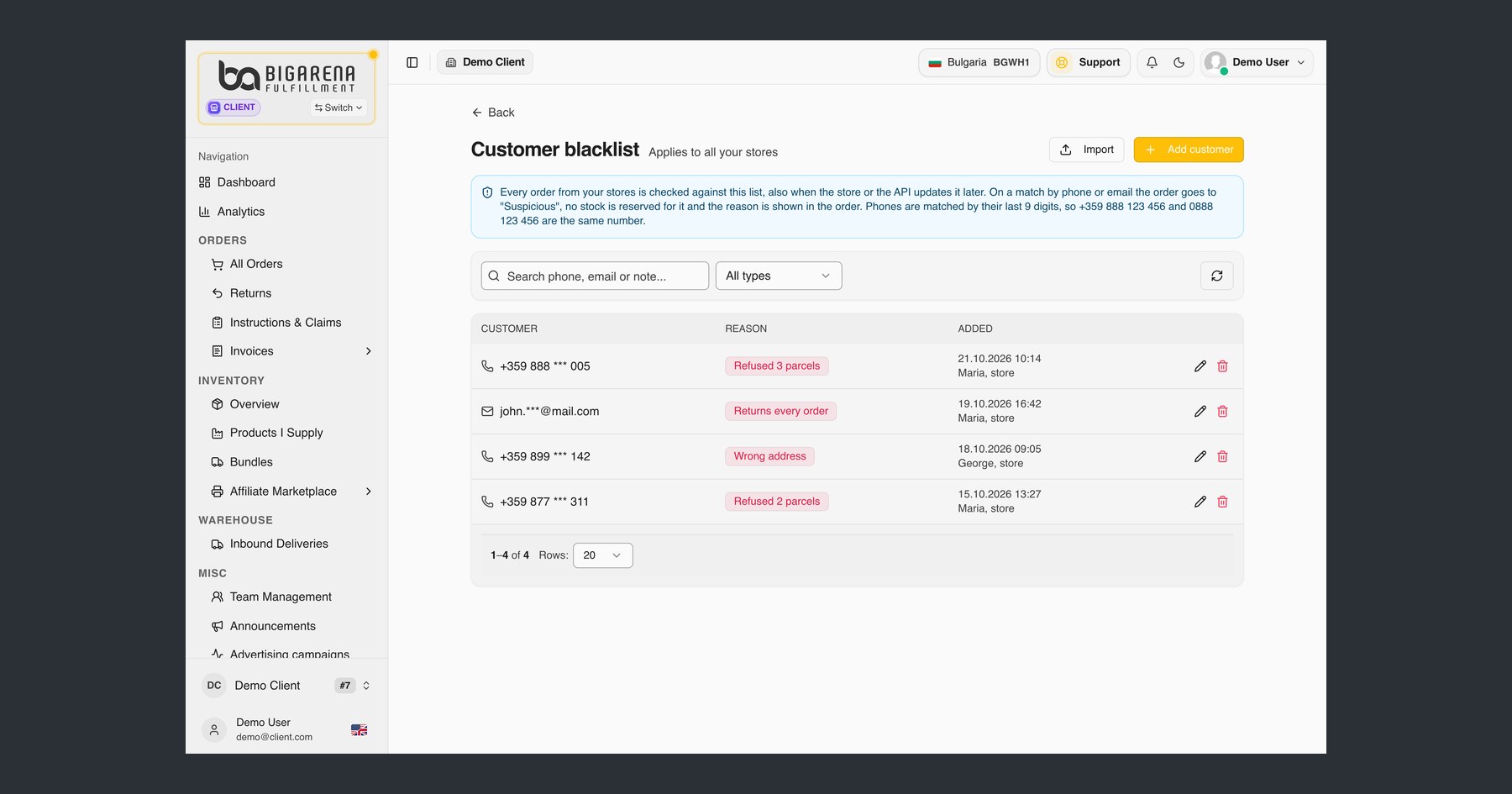
Every online store that offers cash on delivery knows the situation: a customer who keeps refusing parcels places yet another order. If nobody spots it in time, the parcel goes out, travels and comes back. In the BigArena client panel you can now keep a list of customers who keep refusing parcels, or whom you do not want to ship to for another reason. Their orders stop for your review, and you decide what happens next.
What the customer blacklist is
It is your own list of phone numbers and email addresses of end customers you do not want to ship to. Each entry has a reason, for example refused parcels, and an optional short note.
- The list applies to all your stores connected to BigArena.
- The list is yours only and is not shared with other clients.
- You can delete an entry at any time.
- The "Customer Trust Factor" app that contains the list is free.
What happens to an order from a blacklisted customer
Every order from your stores is checked against the list, also when the store or the API updates it later. If the phone number or email in the order matches an entry, the order goes to the status "Suspicious":
- it is not shipped until you decide;
- no stock is reserved for it;
- the reason you entered is shown in the order itself.
The order is not refused automatically. You review it and decide whether to ship it.
How phone numbers are matched: by their last 9 digits. So +359 888 123 456 and 0888 123 456 count as the same number, however the customer typed it. When you review an order, check the full number and the other order details to be sure it is the same person.
How to add customers
In the client panel at my.bigarena.net, open Apps → "Customer Trust Factor" → "Customer blacklist" → "Manage". That is the current name of the feature in the panel.
You can add a customer by hand with the "Add customer" button, or many at once with "Import".
Import from a file in three steps
1. File. Upload a CSV, XLSX or XLS file of up to 2 MB and 5,000 rows. Only the first sheet is read. One column is enough, for example only phone numbers or only emails, and a header row is optional. A file can look like this:
2. Columns. The system detects the phone, email and note columns, and you check and confirm them. You choose one reason that applies to all rows. If you select a note column, its value is saved for that row instead of the general note.
3. Result. You see how many entries were added, how many were already in the list, how many are repeated in the file, how many are invalid (a wrong email or phone number) and how many rows are empty. You can open the details for the added and the invalid entries.
Who to add to the list
You decide who goes on the list and why, so the list is your responsibility. A few rules protect both you and your customers:
- only add people you have a specific reason for, such as a customer who keeps refusing parcels;
- in the note, write only facts about orders, with no offensive words and no sensitive data such as health or ethnic origin;
- mention in your privacy policy that orders may be held for review based on a phone number or email;
- if a buyer asks to see or delete their data, the request goes to you, because you keep the list;
- review the list from time to time and remove entries you no longer need.
Why it matters for cash on delivery
Every refused cash-on-delivery parcel costs you shipping both ways, and the goods sit in transit instead of being sold. The list does not replace order confirmation, but it stops in time the orders you already know you do not want to ship. How cash on delivery works across Europe is covered in our cash on delivery guide for Europe. For more ways to cut refusals, read how to reduce refused cash-on-delivery parcels.
Frequently asked questions
How do I stop orders from a customer who keeps refusing cash on delivery parcels?
Add their phone number or email to your customer blacklist in the panel. Their next orders go to the status "Suspicious", no stock is reserved for them, and you decide whether to ship them. It works for Shopify, WooCommerce and every other store connected to BigArena.
Is the list shared with other stores or BigArena clients?
No. The customer blacklist is yours only and is not shared with other clients: you decide whom to add and why, and their orders go to your manual review instead of being refused automatically. Only add people you have a reason for, and inform them in your privacy policy.
Is the order refused automatically?
No. The order goes to the status "Suspicious" and is not shipped until you review it. Whether to ship it is your decision.
Can I remove a customer from the list?
Yes, at any time. Once you delete the entry, new orders with that phone number or email no longer stop for review.
What file can I upload?
CSV, XLSX or XLS, up to 2 MB and 5,000 rows. Only the first sheet is read. One column of phone numbers or emails is enough.
How much does it cost?
The "Customer Trust Factor" app that contains the list is free.
You decide which orders go out.
If you already work with us, the list is waiting in your panel. If you are not a client yet, tell us how many orders you ship a month and to which countries, and we will send you a quote.
Request a quote