1. Home
  2. Fulfillment
  3. BigArena Software Platform

BigArena software - the fulfillment control platform

Full control over inventory, orders, couriers, returns and analytics in real time - from one browser panel or mobile device. Proprietary software, built specifically for the needs of online merchants, integrated with all our warehouses and courier partners.

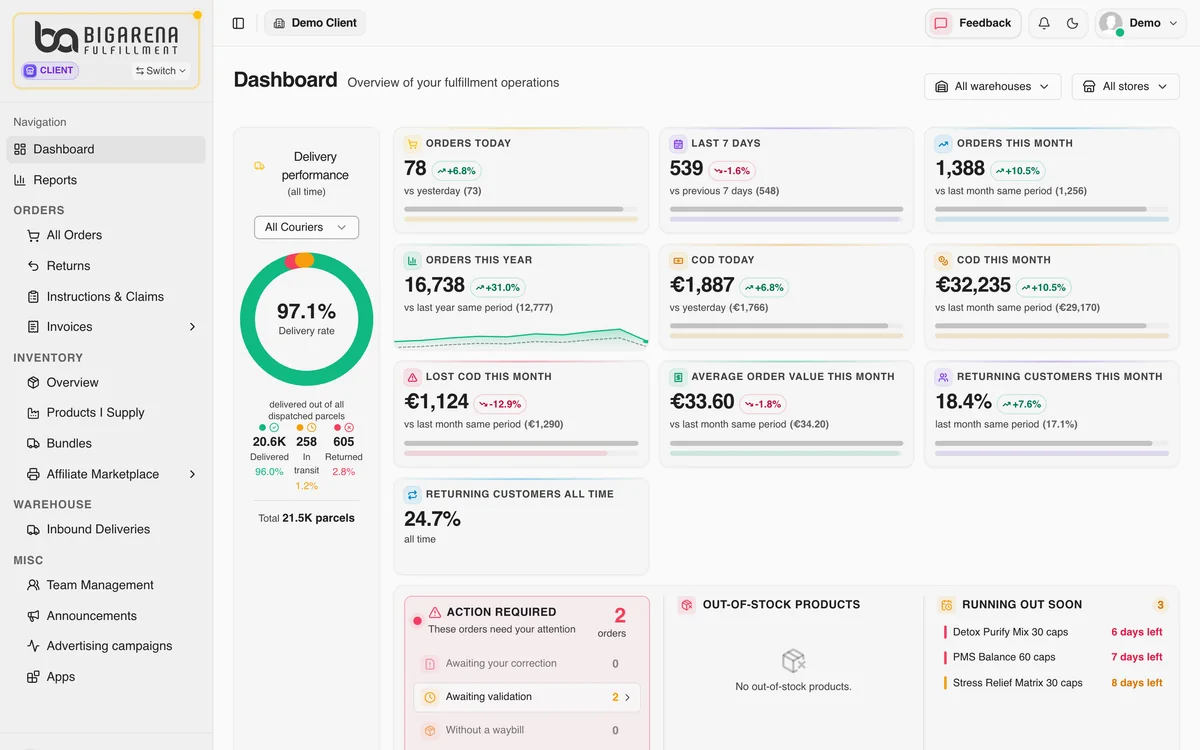
Dashboard in the BigArena client panel
8 warehouses in 7 countries700+ client companies20M+ shipments since 201940+ courierssame-day dispatch for orders by 14:00

Your single screen for daily operations

BigArena software brings all the logistics of your online store into a single interface: inventory, incoming shipments, orders, courier integrations, returns and analytics. It runs in real time - no delayed data, no overnight syncs. Available in 8 languages (English, French, Greek, Macedonian, Romanian, Serbian, Slovak and Bulgarian), integrated with the popular accounting systems. The software works alongside our end-to-end fulfillment service.

All our warehouses run on one system. If your stock sits in more than one BigArena warehouse, you see stock per warehouse, orders, cash on delivery, returns and all your stores in this one panel, and the same data via API. Read how it works.

5 core modules - what each one does

Each module is built for a specific daily task an e-commerce merchant faces. Below - real screens and a description of the features.

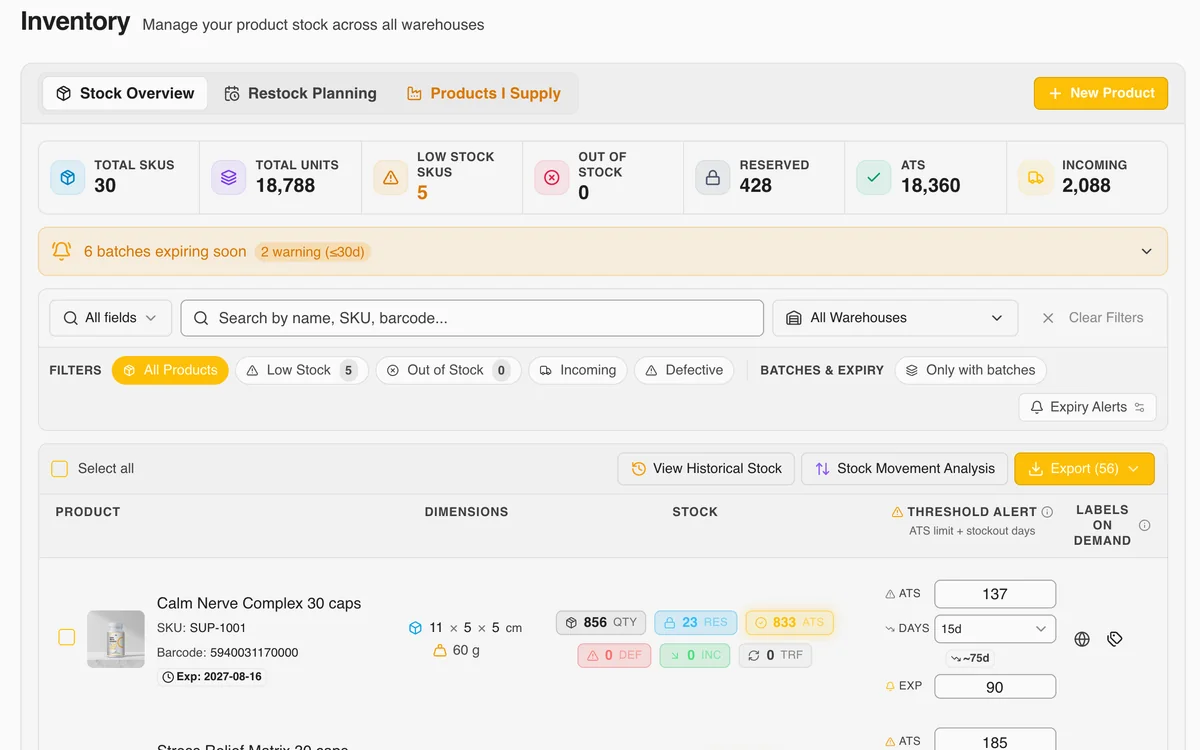
Inventory module in BigArena software - stock, batches and expiry dates
Inventory: batches and expiry dates, with an alert for batches expiring soon

1. Inventory - batches and expiry

Exact stock for every item at the moment you check - no delayed data, no overnight syncs. For products with an expiry date (supplements, cosmetics, food) we track every batch separately: quantity, date received, expiry date and the warehouse where it sits.

FEFO by default - batches with the nearest expiry date ship first automatically. When expiry approaches, SMS and email alerts are generated with the exact number of days left, so the business has time to react with a promotion or to phase the product out. Every item has a full movement history.
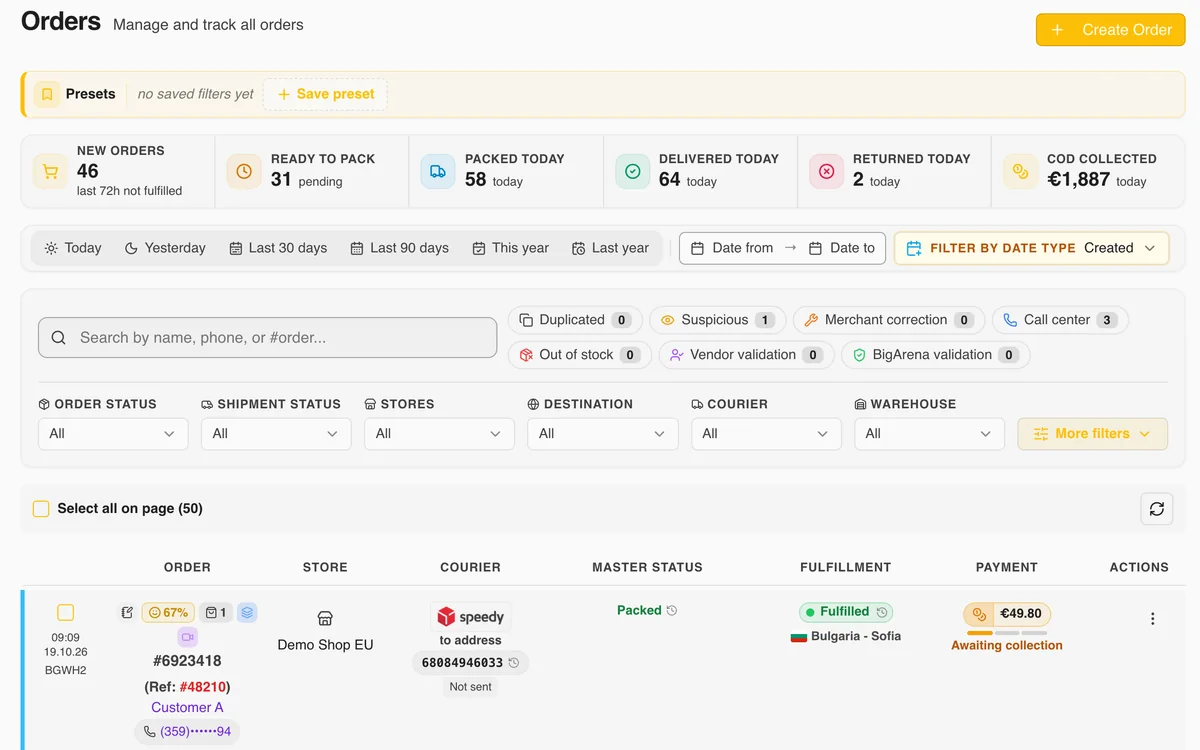
Orders module in BigArena software - real time, statuses and edits
Orders: status, courier and payment for every order

2. Orders - real time, edits and automation

Every order from the online store shows up in the system the moment it's placed. Real-time statuses - awaiting validation, packed, handed to courier, delivered or returned. From the same screen you make changes: reroute to a different address, adjust the COD amount or add packing instructions.

The dashboard shows key metrics by day, week and month - percent successfully delivered, returned, cash-on-delivery orders and payouts, orders with address or phone errors. It lets you spot problems quickly, before they become widespread.

Customer blacklist

A customer keeps refusing parcels? Stop it. Add phone numbers and emails of customers who keep refusing parcels, or whom you don't want to ship to, by hand or from a CSV or Excel file. Their orders stop in the status "Suspicious" for your review, and you decide whether they go out. The list is yours only and applies to all your stores.

How it works →

Import products from a file

Creating a manual order with many products? Upload an Excel or CSV file with SKUs and quantities. The system recognises the products and shows which ones have a problem before they go into the order. The file is not stored.

Support in the panel

A question, a bug, an integration or an invoice: write to us straight from the panel and attach screenshots or files. Follow the reply under Active, Your reply and Resolved, and reopen a resolved request within 7 days.

How it works →
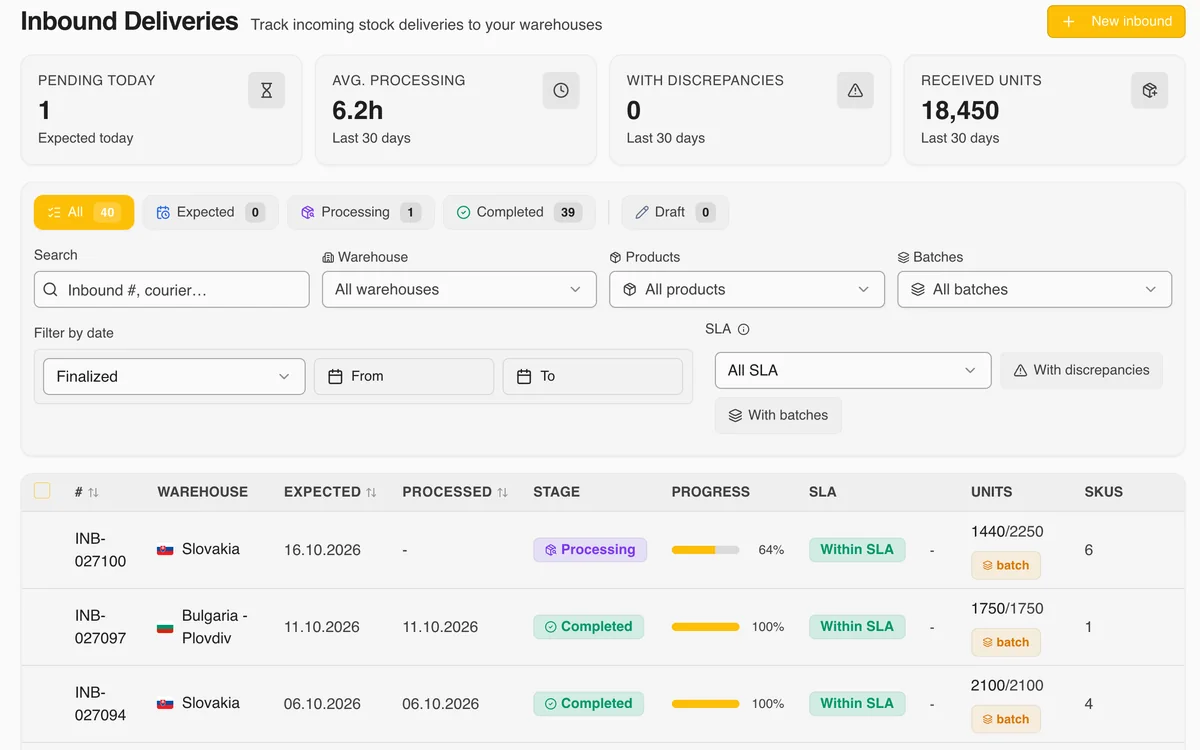
Incoming shipments module in BigArena software - receiving and control
Inbound deliveries: expected and received quantities, SLA and discrepancies

3. Incoming shipments - receiving and control

When you plan to send stock to our warehouse, you create an incoming shipment in the system with expected date, items, quantities and batches. Our team scans everything on arrival, cross-checks against what was expected and receives it in real time - every shortage, defect or overage is flagged automatically, with a photo attached from the receiving area.

You get a notification the moment the batch is received, with a full report: what was accepted, what didn't match expectations and when it will be available for sale. All the correspondence and history stay attached to the shipment for future reference.

Courier integrations and warehouse locations in BigArena software
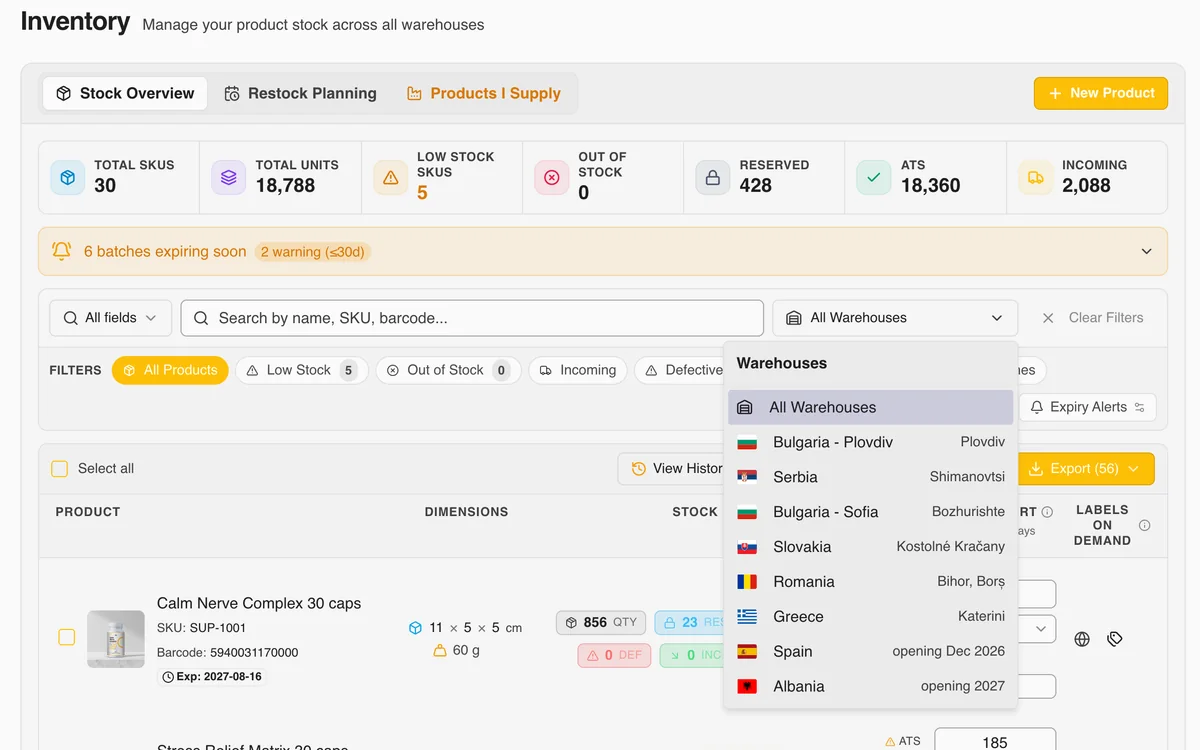
Warehouse filter: every BigArena warehouse in one list

4. Couriers and warehouse locations

The platform runs over 40 courier integrations across Europe - Speedy, Econt, DHL, FedEx, Cargus, Sameday, FAN Courier, ACS, Packeta, Slovak Parcel Service and more. Your customer chooses the courier at checkout from the couriers you have enabled - BigArena does not select it automatically.

You run all the warehouse locations (Sofia, Plovdiv, Slovakia, Romania, Serbia and Greece; Spain and Albania opening soon) from one screen. You see stock by location, request replenishment between warehouses and track every parcel from dispatch to delivery with full courier statuses.

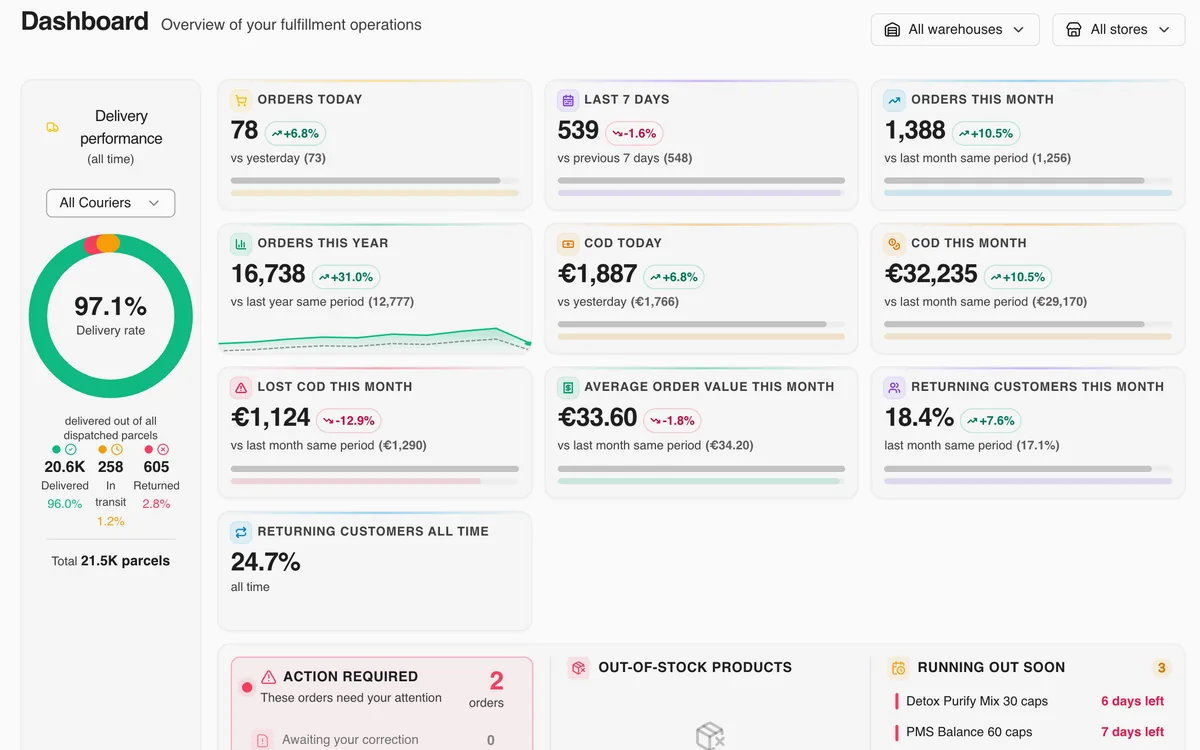
Analytics and reporting dashboard in BigArena software
Dashboard: orders, cash on delivery, delivery rate and orders that need action

5. Analytics and reporting

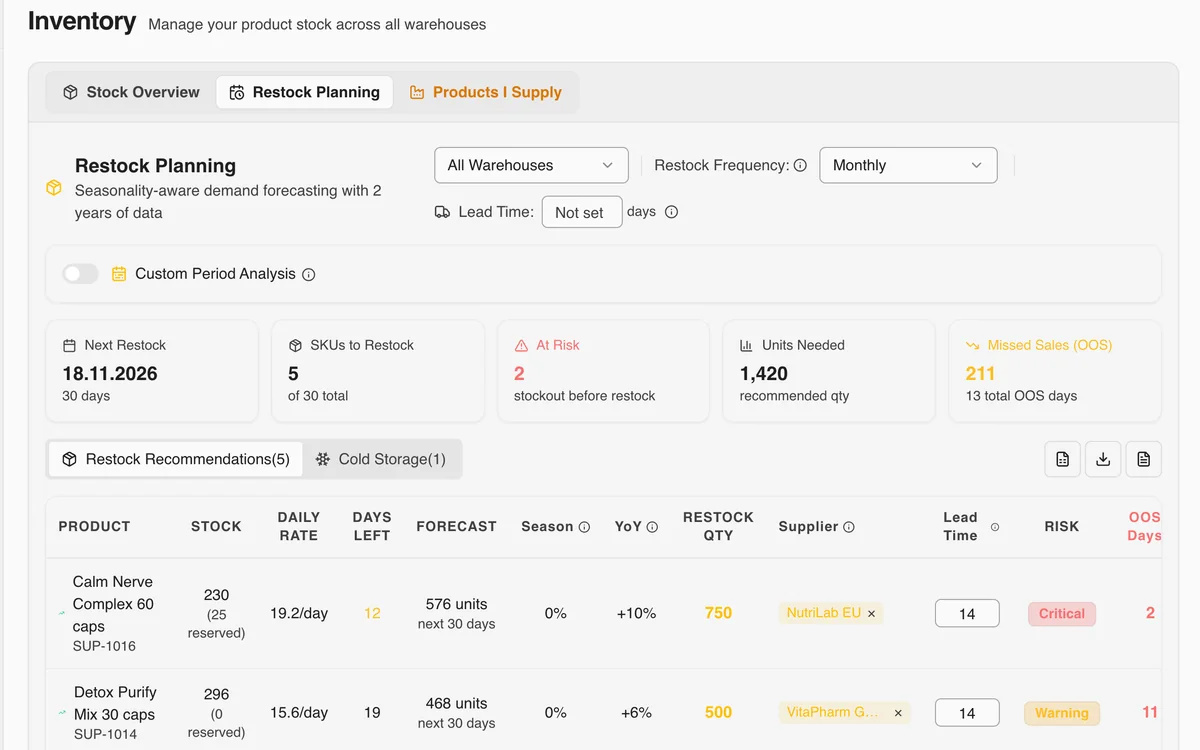
The main dashboard brings all the key business indicators together in one place: daily turnover, average number of orders, delivered rate, return rate, stockout forecast based on seasonality and the last 7/14/30 days. Every report can be exported to PDF and Excel.

Deeper down you get a suggested reorder quantity from the manufacturer, an analysis of the most profitable SKUs, an analysis of dead stock, split of shipments by courier and by region, and promo campaign performance. The whole platform runs in real time.

More screens from the panel

Real screens from the client panel, shown with demo data.

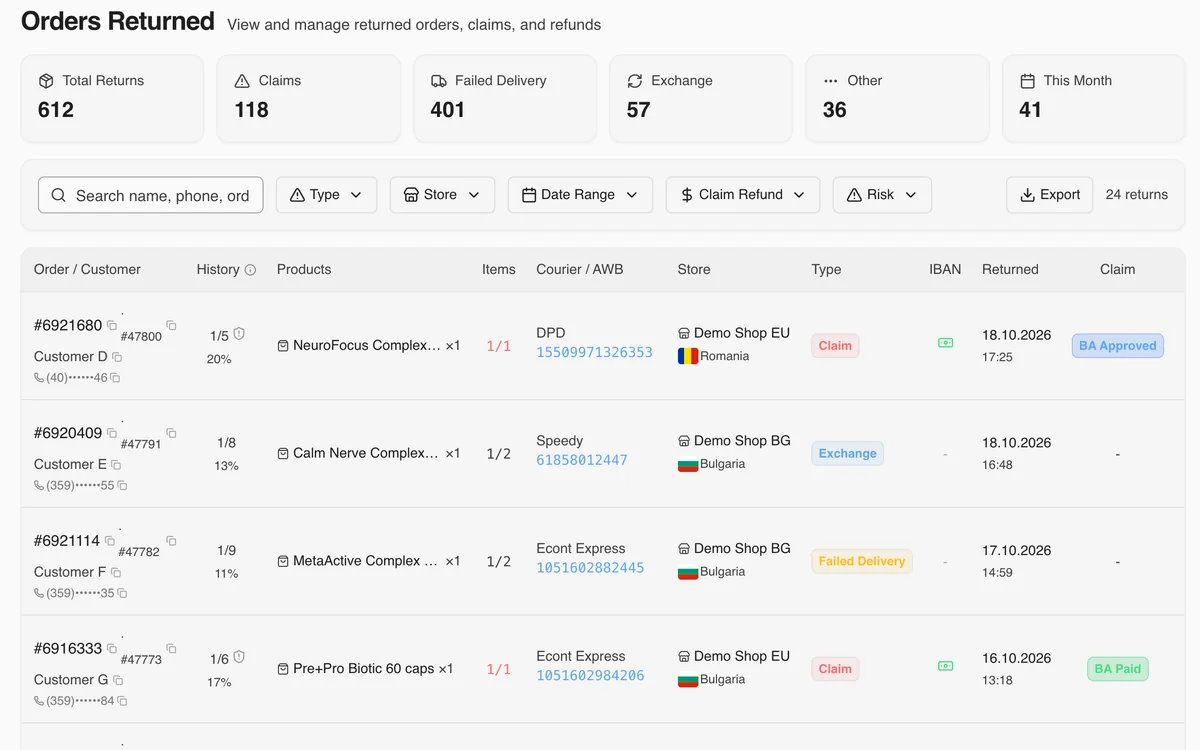
Returns - BigArena
Returns: claims, exchanges and failed deliveries
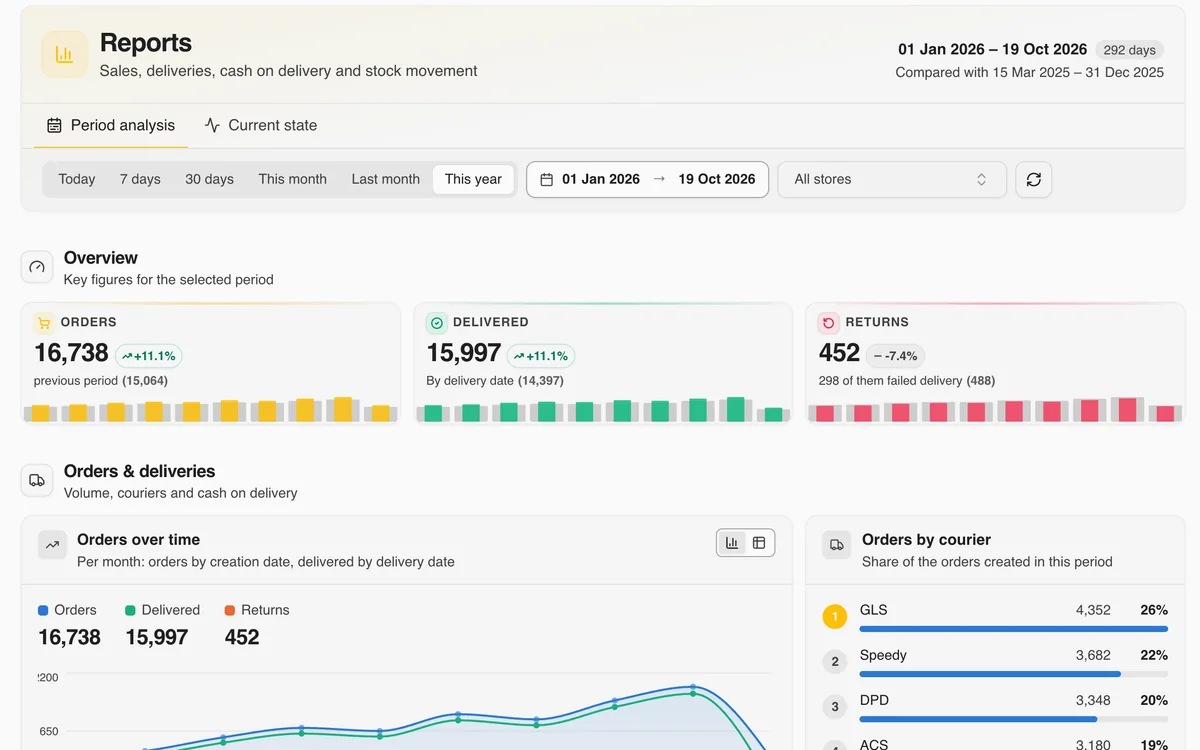
Reports - BigArena
Reports: orders, delivered and returned for any period, share by courier
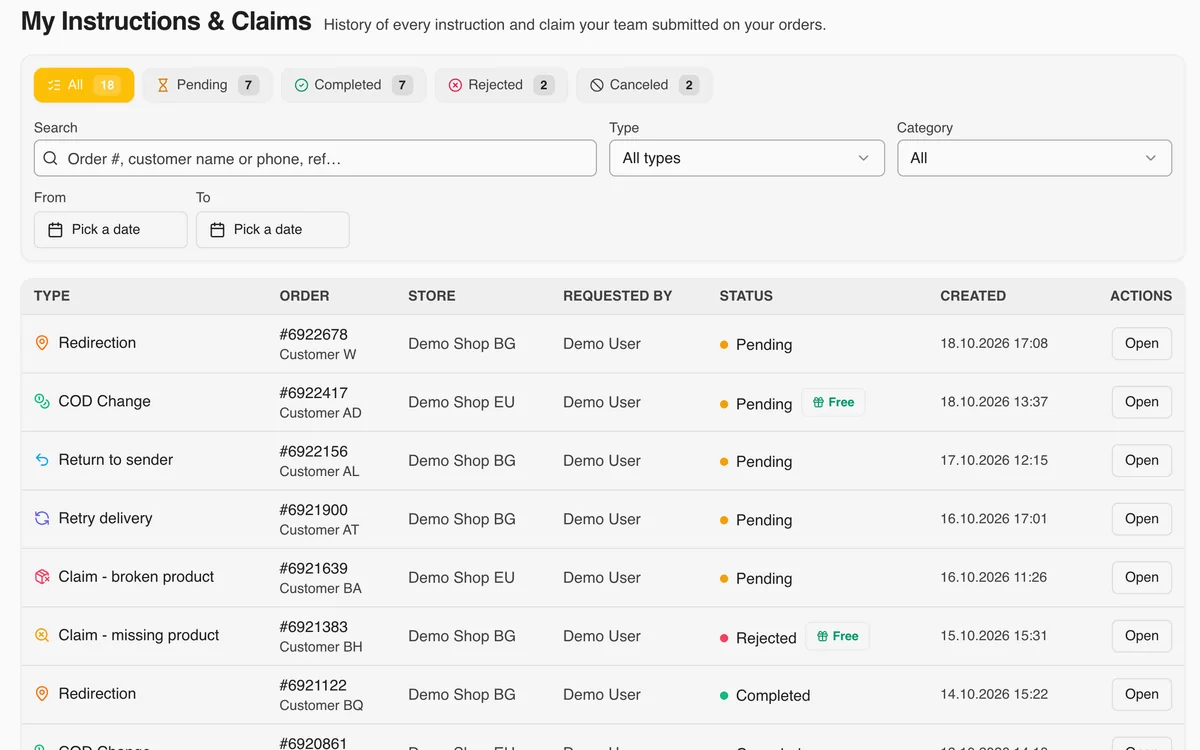
Instructions and claims - BigArena
Instructions and claims: every request from your team and its status
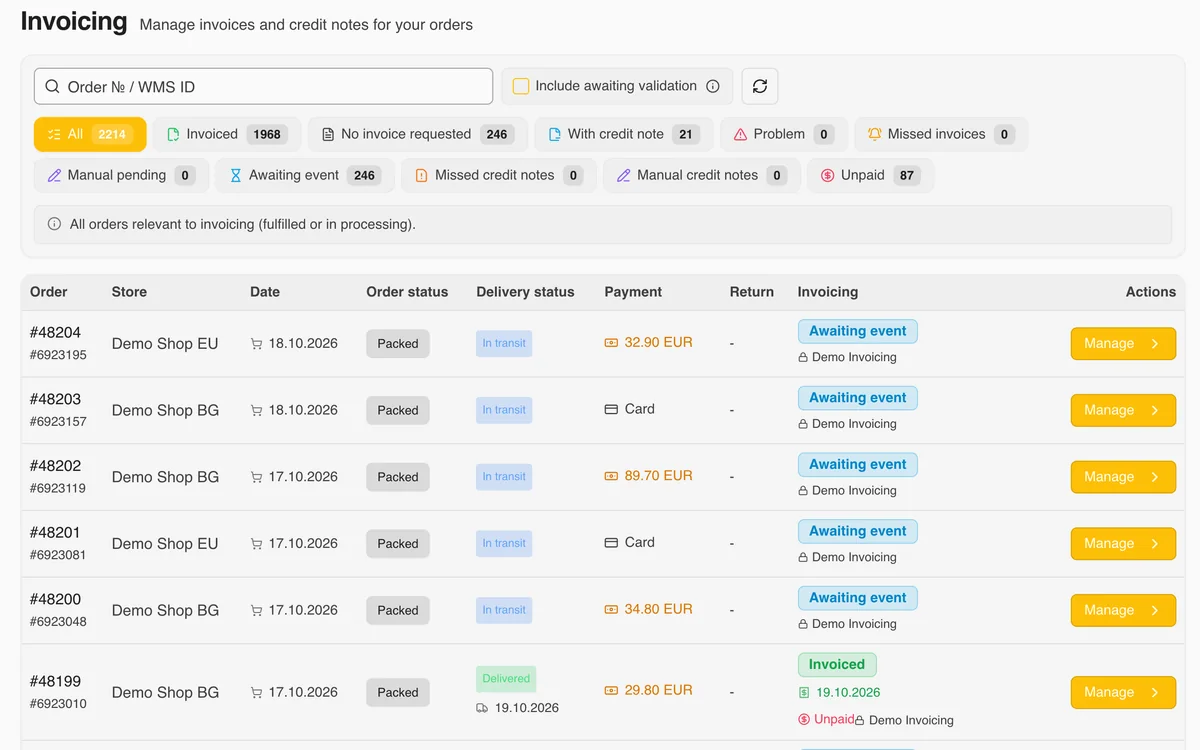
Invoices - BigArena
Invoices: invoices and credit notes for your orders
Restock planning - BigArena
Restock planning: demand forecast and recommended quantities
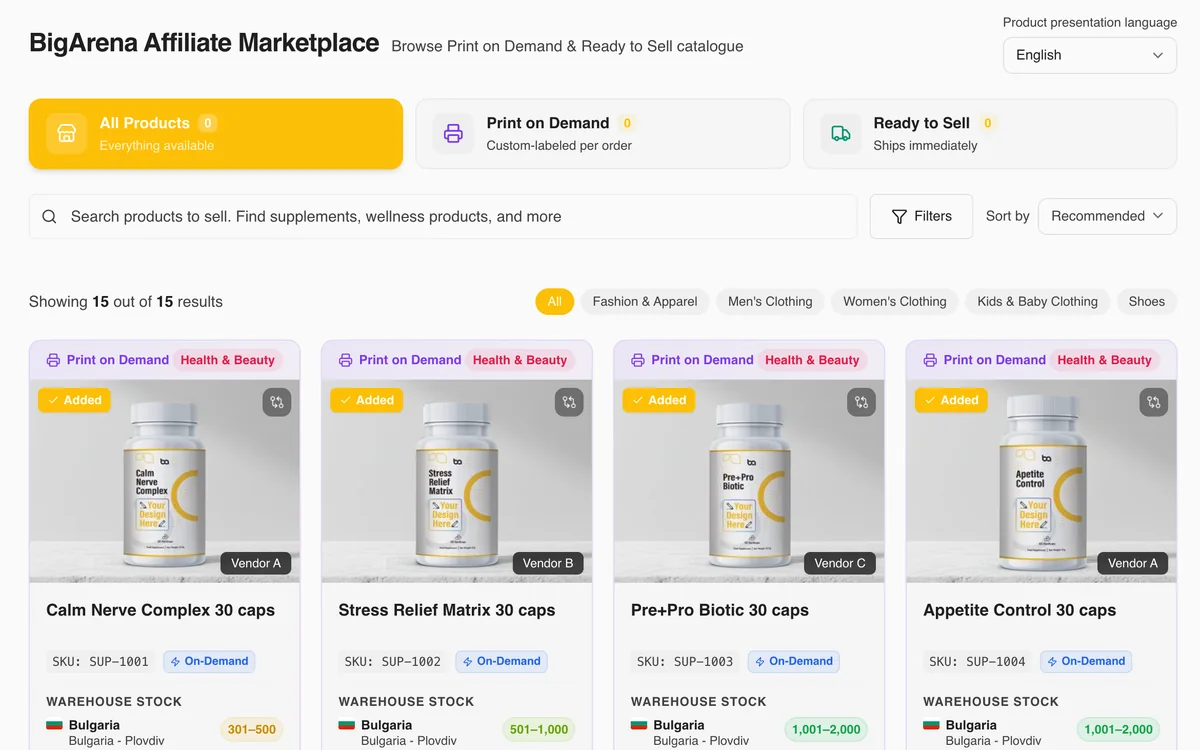
Marketplace - BigArena
Marketplace: products under your own label and ready-to-sell products, with no stock to buy upfront

What you get with BigArena software

Four key advantages that set BigArena software apart from stand-alone WMS solutions.

01

Inventory and orders in real time

Live data - no overnight syncs, no delay. You see exactly how much stock you have, where each order is and when it will arrive.

02

Video recording of 96% of parcels

Every moment of packing is on camera. If a dispute comes up with a customer or courier, you have undeniable proof of what was in the parcel.

03

Automated documents

Waybills, receipts and audit files are issued automatically. No manual bookkeeping work.

04

Integrated with 40+ couriers and every leading e-commerce platform

Shopify, WooCommerce, Magento, PrestaShop, CloudCart and more. Ready integration in about half an hour, no developer needed on your side.

Frequently asked questions about BigArena software

The answers we hear most often on demo calls.

What language is the interface in?

Available in 8 languages: English, French, Greek, Macedonian, Romanian, Serbian, Slovak and Bulgarian. All menus, messages, reports and notifications - the language is selected from the settings panel. For a team with international staff you can set a different language per user.

Can I manage several stores from one account?

Yes. One BigArena account can manage an unlimited number of online stores, each with its own order channels, courier rules and branded packaging. Especially useful for merchants running separate BG/EU/US storefronts on a shared catalog.

Does it integrate with accounting software?

Yes, the platform issues invoices, receipts and audit files in standard formats (PDF, Excel) that import into popular Bulgarian accounting systems - Microinvest, Ajur, Business Navigator and others. For specific needs we build custom API bridges.

Is there a mobile version?

Yes - the whole platform is responsive and works in any browser on phone or tablet. No need to install a native app. The main operations (status checks, order confirmation, analytics review) are optimised for mobile.

How long does it take to go live?

From the first call to the first shipment it usually takes 2-8 days. Connecting the store itself takes about half an hour once you give us access: we connect the store, map the items and check everything with test orders.

Is the software billed separately?

No. BigArena software is included free as part of our fulfillment service. You only pay for the logistics you actually use - storage, packing, courier. Software, training and integrations are at no extra cost.

Can I see stock in several BigArena warehouses in one panel?

Yes. All our warehouses run on one system: stock per warehouse, orders, cash on delivery, returns and all your stores are in one panel, and the same data is available via API. Collected and paid-out COD amounts and the exchange rate used sync in real time.

Can I stop orders from a customer who keeps refusing parcels?

Yes. In the panel you add the customer's phone number or email to your customer blacklist, by hand or from a CSV, XLSX or XLS file. Their orders go to the status "Suspicious" for your review, no stock is reserved for them, and you decide whether to ship them.

Is the customer blacklist shared?

The customer blacklist is yours only and is not shared with other clients: you decide whom to add and why, and their orders go to your manual review instead of being refused automatically. Only add people you have a reason for, and inform them in your privacy policy.

Can I add the products to an order from an Excel file?

Yes. When you create an order in the panel, click "Import from file" and upload an .xlsx or .csv file of up to 5 MB and 1,000 SKUs. The system recognises the products and shows which ones have a problem before they go into the order.

How do I contact BigArena support?

In the panel, click "Support" at the top right and then "New request". Choose the topic, write a description and attach files if needed. Every request gets a number, and you get an email and a notification every time we reply.

How do I see how many of my parcels were not collected?

In the panel, the "Uncollected %" card in the Orders Returned page shows the share of uncollected parcels for the chosen period and stores. It is calculated by dispatch date, without claims and exchanges and without parcels still in transit. The formula is uncollected parcels divided by completed shipments, times 100.

Can I see the uncollected rate for a single month?

Yes. Pick a period, for example a single month, and the stores you want. The "Uncollected %" card shows the rate for exactly that selection.

Ready to see the platform live?

Book a free 30-minute demo call. We walk through the specific modules that match your business - cosmetics, food, clothing, electronics or whatever you sell.

Book a demo →

Book a BigArena demo

Schedule an online meeting with our sales team - they'll show you what the software looks like for your store.

How do we find you?

How should we call you?

Tell us what you're looking for